Your agent is burning tokens while you sleep. Here's how to stop the bleeding and take back control of your AI spend.
Last Tuesday, I woke up to a Slack notification from a user that made my stomach drop.
"Hey, is it normal to spend $22 per day on API costs? I'm using Haiku 4.5 and all I'm doing is setting up a mission control and second brain."
Twenty-two dollars a day. On Haiku. The cheapest model in the Anthropic lineup.
That's $660 a month for an agent that's supposed to save you time, not drain your bank account. And this person isn't an edge case. They shared their OpenClaw usage dashboard on Reddit, and the numbers told a painful story: 670 messages, 505 tool calls, 80.6K average tokens per message, and an error rate that suggested something was deeply wrong with their setup. If you're still in the setup phase, getting the model routing right from the start prevents most of these cost blowouts.
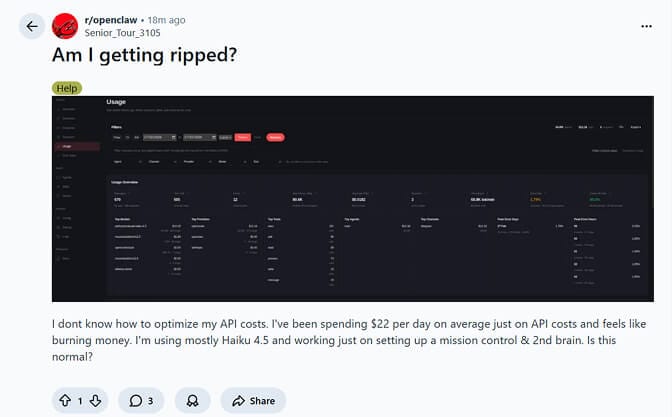
Real Reddit post from r/openclaw. This is more common than you think.
But that's not even the worst case we've seen.
Another developer posted their multi-agent workflow results. They'd burned through 400 million tokens with zero tangible output. The agents were looping, re-analyzing the same steps, stalling mid-workflow, and hemorrhaging context like a broken pipe.
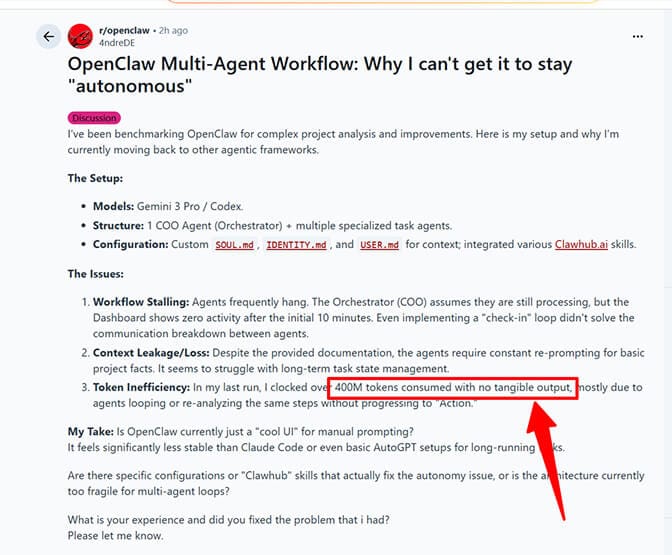
400 million tokens consumed. No output. This is the nightmare scenario nobody warns you about.
These aren't isolated incidents. A GitHub discussion thread titled "Burning through tokens" has developers sharing war stories of $10+ days on moderate usage, $50 heartbeat bills, and one memorable case of a $3,600 monthly API bill.
If you're running OpenClaw and your costs feel out of control, you're not alone. And you're probably making at least two of the five mistakes I break down further down this page. First, though, the numbers those mistakes get multiplied by.
What OpenClaw Actually Costs Per Model
The framework is free. Everything you pay goes to whichever model provider you point it at. Here are the rates that matter, current as of September 2026.
| Model | Input per million | Output per million |
|---|---|---|
| Claude Opus (4.6 through Opus 5) | $5.00 | $25.00 |
| Claude Sonnet 4.6 | $3.00 | $15.00 |
| Claude Sonnet 5 | $2.00 | $10.00 |
| Claude Haiku 4.5 | $1.00 | $5.00 |
deepseek-flash, off-peak | $0.15 | $0.60 |
deepseek-flash, peak hours | $0.30 | $1.20 |
| Gemini 2.5 Flash | Free tier: 1,500 requests/day | — |
Two things people consistently get wrong about this table.
Opus is not 5x Sonnet any more. The $15/$75 figure you'll still find quoted across older cost posts was Opus 4.1. From Opus 4.6 onward the price is $5/$25, which makes Opus roughly 1.7x Sonnet 4.6 and 2.5x Sonnet 5 per token. It's still the expensive choice. It is not the catastrophic choice it used to be, and any advice built on a 5-10x gap is out of date.
DeepSeek's cheap tier runs on a clock. deepseek-flash (DeepSeek-V4.1-Flash) bills $0.15/$0.60 per million off-peak and $0.30/$1.20 during peak hours, which run 01:00-04:00 and 06:00-10:00 UTC, Monday to Friday. Cache hits are $0.003 per million. If your cron jobs happen to fire inside that window, you're paying double for nothing. The older deepseek-v4-flash name still resolves, but it's served by V4.1-Flash at these prices, so quotes of "$0.14/$0.28" are stale.
The multiplier nobody prices in: calls per task
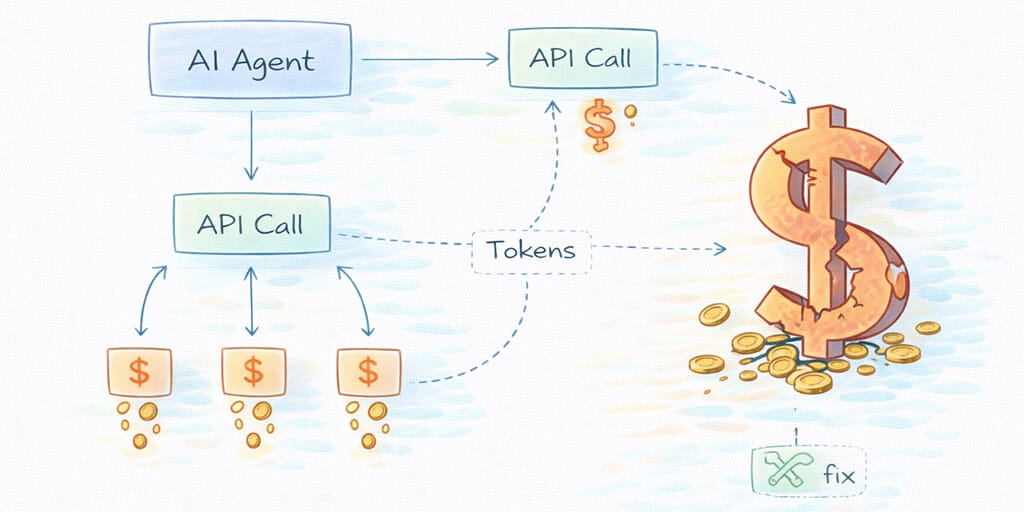
Per-token rates only tell you half the story, because an OpenClaw agent doesn't make one call per task.
"Summarize this email" might take one API call. "Research competitors and draft a report" can trigger 15 to 30. Each call carries input tokens (your prompt, system instructions, the full conversation so far) and output tokens. So call #1 in a chain might cost $0.02, while call #15, carrying the context of calls 1 through 14, costs $0.35. Cost within a single OpenClaw task isn't linear. It compounds.
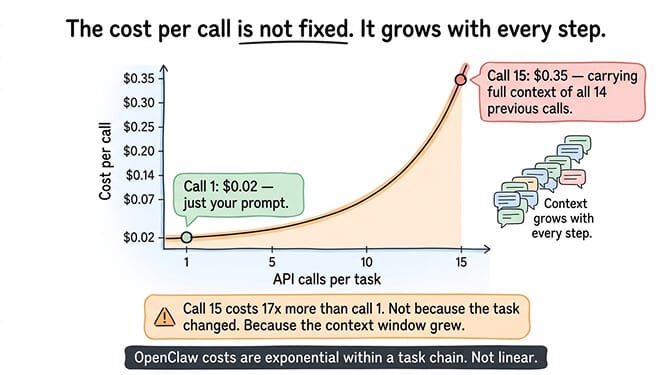
Put numbers on it. On a 20-call task chain averaging 2,000 tokens of output per call, the output side alone runs about $1.00 on Opus, $0.60 on Sonnet 4.6, and $0.40 on Sonnet 5. Ten such tasks a day works out to $300/month on Opus, $180 on Sonnet 4.6, and $120 on Sonnet 5, before you count a single input token.
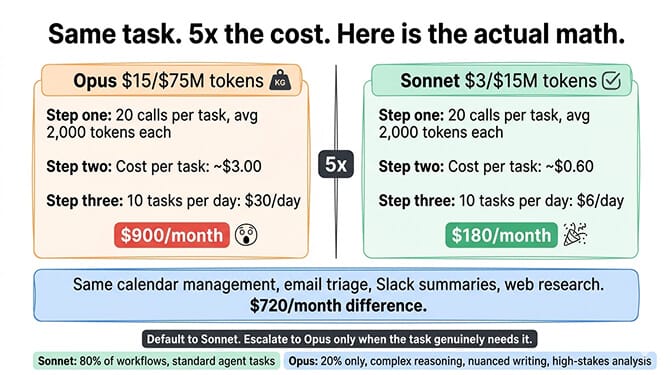
That's the case for reserving Opus for the 20% of work that needs it: complex reasoning chains, nuanced writing, multi-step analysis where getting it wrong costs more than the API call does. For the per-task data behind choosing between Sonnet and Opus, our model comparison has the breakdown.
The 136K Problem Nobody Talks About
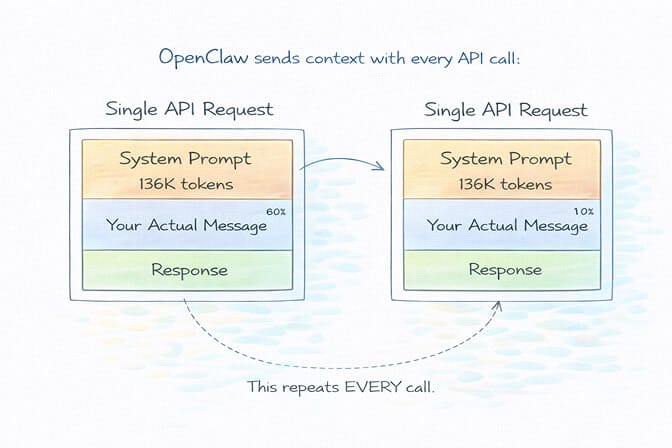
Here's something that shocked me when I first dug into how OpenClaw works under the hood.
Every single API call your agent makes carries a base system prompt of roughly 136,000 tokens. That's not your personality files. That's not your custom instructions. That's OpenClaw's internal framework overhead: tool schemas, agent configuration, memory context, and system-level instructions.
One hundred and thirty-six thousand tokens. Sent with every request.
On Claude Haiku 4.5, at $1 per million input tokens, that's about $0.136 per uncached call for the system prompt alone. Prompt caching brings it down to roughly $0.0136 on a cache hit, because cached reads bill at about a tenth of the base rate. Which sounds fine, right up until you do the arithmetic on 500 tool calls a day at a realistic hit rate.
The biggest line item on your OpenClaw API bill isn't the work your agent does. It's the context it carries while doing it.
And here's what makes it worse: Anthropic's prompt caching only helps if your requests hit the cache window, which has a 5-minute TTL. If your agent goes idle for six minutes between tasks, the next request is a cold start. Full price. Every token.
That Reddit user spending $22/day? Their dashboard showed an 86.5% cache hit rate, which sounds great until you run it. At 500 tool calls a day, a 13.5% miss rate is about 68 calls carrying the full 136K at $0.136 each: $9.25. The other 432 calls bill at $0.0136: $5.88. That's roughly $15/day in system-prompt overhead alone, before a single token of their actual 80,600-token-per-message conversations. The cold starts really were eating them alive.
The Five Ways Your OpenClaw Agent Bleeds Money
I've spent months watching users rack up unnecessary API costs. The patterns are remarkably consistent.
1. The "Wrong Model for Every Job" Trap
This is the most common and most expensive mistake.
Your agent is using Claude Opus to check the weather. It's using Sonnet 4.6 to read a file name. It's deploying a $5-per-million-token model for tasks that a $0.15-per-million-token model handles perfectly.
The cost difference is still stark. Running GPT-4o-mini at 3,000 messages per month costs about $3. Running Claude Opus at the same volume? About $47. That's a roughly 16x difference for many tasks where the output quality is indistinguishable. (It used to be 47x, back when Opus billed at $15/$75. The gap narrowed when Opus dropped to $5/$25. It did not close.)
Most OpenClaw users set one model as their default and forget about it. That single decision can be the difference between a $15 month and a $150 month.
2. The Heartbeat Money Pit
OpenClaw's heartbeat feature is brilliant in concept: your agent proactively wakes up, checks for tasks, and takes action without being prompted.
In practice, it's a cost bomb.
Every heartbeat trigger is a full API call. It carries the entire session context. If you've configured it to run every 5 minutes, that's 288 API calls per day of pure overhead. One developer on GitHub reported their heartbeat alone was costing $50 per day.
Here's what makes it insidious: the heartbeat runs whether or not there's anything to do. Your agent wakes up at 3 AM, sends 136K tokens to check if there are new emails, finds nothing, and goes back to sleep. Then does it again five minutes later.
Heartbeats are just the most visible member of a whole category. Hidden OpenClaw costs: heartbeats, token overhead, and what's silently draining your budget covers the retry loops and tool-schema re-sends that sit alongside them on the invoice.
3. Context Bloat (The Silent Killer)
Every message in your conversation history gets sent with every new API call. Every. Single. One.
Start a fresh session and your first message might cost $0.02. By message 50, you're carrying so much context that each request costs $0.15+. By message 200, you're pushing the context window limits and your agent starts forgetting things anyway.
That second Reddit user who burned 400 million tokens? Their agents were stuck in loops, re-analyzing the same steps because the context had grown so large that the model was losing track of what it had already done. The irony is brutal: the more context you carry, the worse your agent performs and the more you pay.
4. Unmonitored Automations
This is where OpenClaw costs go from "annoying" to "terrifying."
A workflow that triggers 10 times per day during testing might trigger 500 times per day once connected to live inputs. Browser automation sessions are especially expensive because every navigation step requires a model decision. And if an automated task gets stuck in a loop? One user reported burning $200 in a single day because a task was retrying infinitely.
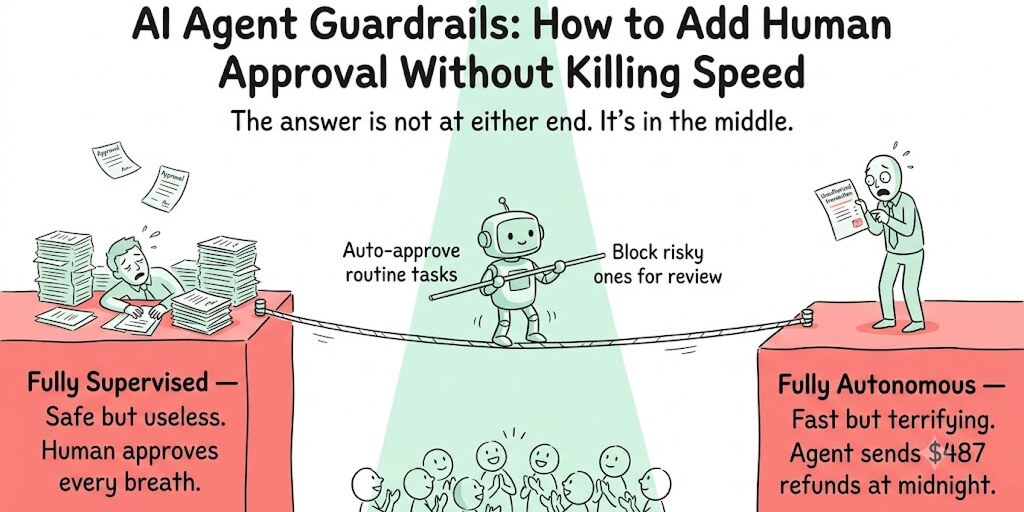
Without spending limits and monitoring, an OpenClaw agent is a credit card with no maximum and no alerts.
5. Skills Stuffed into Personality Files
This is a sneaky one.
Many users put detailed instructions, templates, and workflow guides directly into their personality markdown files (SOUL.md, IDENTITY.md, USER.md). The problem? Those files are loaded with every single API call. Every instruction you add increases your per-message cost across the board.
A community member on the OpenClaw GitHub shared a smarter approach: move instructions into skills instead. Skills are only loaded when relevant, not with every request. This alone can cut your per-message token overhead significantly.
How to Actually Fix Your OpenClaw API Costs
Enough about the problems. Let's talk solutions. What follows is the short version, ordered by impact. If you want the long version with the config lines and the arithmetic for each change, the eight-step OpenClaw API cost optimization stack is the step-by-step walkthrough.
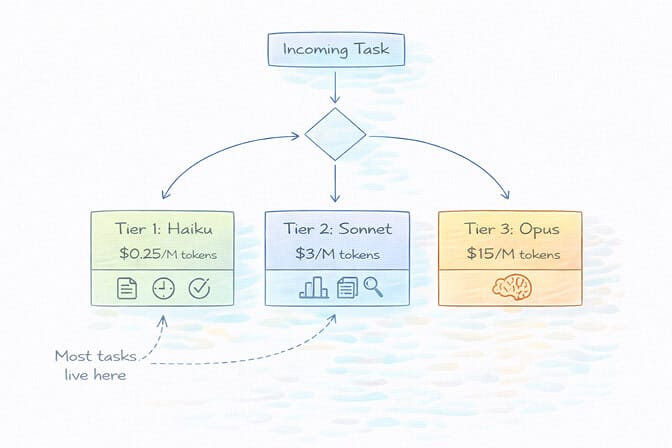
Set Up Model Routing (This Alone Saves 50-70%)
The single highest-impact change you can make is configuring a model failover chain that matches capability to task complexity.
The playbook:
Tier 1 (routine tasks): Use Haiku 4.5 or GPT-4o-mini for simple queries, file operations, and basic tool calls. Cost: fractions of a cent per message.
Tier 2 (moderate complexity): Route to Sonnet 4.6 ($3/$15) or Sonnet 5 ($2/$10) for tasks requiring nuanced understanding. Cost: a few cents per message.
Tier 3 (complex reasoning): Reserve Opus ($5/$25) or GPT-5.2 for genuinely difficult problems, debugging, and multi-step analysis. Use sparingly.
Most agent tasks live in Tier 1. Responding to simple queries, performing file operations, executing basic tool calls: Haiku handles these perfectly. You save Opus for when you actually need it.
Tame the Heartbeat
Two options here:
Option A: Increase your heartbeat interval to 30 minutes or 1 hour. For most personal assistant use cases, checking for new tasks every 5 minutes is overkill.
Option B: Configure a local heartbeat check that runs without making API calls. Check system memory and task queues locally, and only trigger an API call when there's actually something to do. This approach was highlighted by a developer who cut their monthly costs from $90 to $6 by implementing local heartbeat logic.
Reset Sessions Aggressively
After completing each independent task, reset the session context. Don't let a morning email summary inflate the context for an afternoon calendar check.
Use the /compact command to compress session history. Delete old session files. Treat context like RAM: the less you carry, the faster and cheaper everything runs.
Monitor Everything (Or Don't Bother)
Set hard spending limits on your API keys. Enable alerts at 50%, 75%, and 90% thresholds. Use separate API keys per workflow so you can track exactly where costs originate.
The OpenClaw /usage full command shows per-request token consumption. Use it. The dashboard shown in that first Reddit screenshot? That user had the data to diagnose their problem. The issue was that they didn't know what the numbers meant.
The ChatGPT OAuth trick (flat-rate conversations)
If you have a ChatGPT Plus subscription ($20/month), you can connect OpenClaw to your ChatGPT account using OAuth. This routes your agent's requests through your ChatGPT subscription instead of the API, meaning you pay the flat subscription fee instead of per-token pricing.
The catch: ChatGPT has usage limits on the Plus plan. You'll hit rate limits during heavy agent usage. It's not suitable for high-frequency cron jobs or tasks that need consistent throughput. But for direct interactions and moderate daily usage, it effectively gives you GPT-4o access for a flat $20/month instead of variable per-token billing.
The ChatGPT OAuth approach works best as a supplement, not a replacement. Use it for your direct conversations with the agent. Keep Haiku or deepseek-flash for automated operations. This hybrid approach caps your conversational costs at a flat rate while keeping background operations cheap.
One warning before you lean on it. OAuth connections are rate-limited aggressively, responses slow to a crawl at peak, and providers have acted against automated usage running through consumer subscriptions before. Google banned users who overloaded their Antigravity backend through OpenClaw. Treat subscription OAuth as a convenience for your own chat traffic, never as the foundation of a production workflow.
The Gemini Flash hack (almost free)
Google Gemini 2.5 Flash offers a free tier through Google AI Studio: 1,500 requests per day, 1 million token context window, no credit card required. For personal OpenClaw use (morning briefings, basic calendar management, simple automations), the free tier is often enough.
Even the paid tier at $0.075 per million input tokens is essentially free at agent scale. A full month of moderate usage runs $1-3 total.
The tradeoff: Gemini's tool calling isn't as reliable as Claude for complex chains. It works well for straightforward operations but stumbles on multi-step reasoning that needs precise instruction following. Best used for heartbeats, simple lookups, and as a fallback model.
For a deeper look at all the budget-friendly providers that work with OpenClaw, our guide to the cheapest OpenClaw AI providers covers five alternatives with real pricing data.
What a Cheap OpenClaw Setup Actually Costs
Ranges are easy to hide behind, so here's a worked example instead.
A founder running one OpenClaw agent for daily email triage, Slack monitoring, and weekly competitor research:
- Primary model: Claude Sonnet 4.6 for email and Slack, about $0.40/day
- Secondary model: Gemini Flash for classification and routing, about $0.05/day
- Occasional model: Claude Opus for the weekly deep-research run, about $0.70/week
That's roughly $16/month in API fees. Swap the primary to Sonnet 5 and it drops closer to $11.
Hosting is what you add on top. A Hetzner VPS is $6/month plus your own maintenance hours. BetterClaw Basic is $19/month (1 agent, 500 credits, 10 connectors), which is the right tier for exactly this setup: one agent, always on, nothing to maintain. Call it $35/month all in. Pro at $49/month only starts making sense once you're running more than one agent (5 agents, 12,000 credits). Both are BYOK with zero inference markup, so the $16 stays $16.
For all four hosting options side by side, including the ones that aren't us, see OpenClaw hosting costs compared.
The Deeper Question: Should You Be Managing This at All?
Here's what nobody tells you about OpenClaw's security and cost risks.
Every hour you spend optimizing token routing, debugging heartbeat configs, monitoring spending dashboards, and resetting bloated sessions is an hour you're not spending on the thing your agent was supposed to help with in the first place.
The OpenClaw maintainer Shadow put it bluntly: "if you can't understand how to run a command line, this is far too dangerous of a project for you to use safely." That warning extends to cost management too. If you're not comfortable diving into token economics and model routing configurations, you will overspend. It's not a question of if, but how much.
We built Better Claw because we got tired of watching smart people burn money on infrastructure problems instead of building actual agent workflows. At $19/month for Basic (one agent) or $49/month for Pro (up to five), you get automatic session management, built-in usage monitoring, and anomaly detection that auto-pauses your agent when costs spike unexpectedly. No heartbeat misconfiguration nightmares. No 136K token overhead bloat. The infrastructure is handled so you can focus on what your agent actually does.
The Real Cost Isn't the API Bill
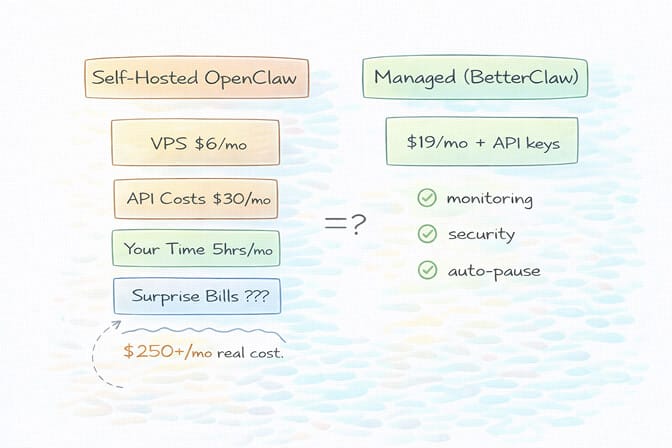
Let me share a quick calculation that changed how I think about this.
Say you spend 5 hours per month configuring, monitoring, and troubleshooting your self-hosted OpenClaw setup. If your time is worth $50/hour (conservative for a developer or founder), that's $250/month in opportunity cost.
Add $30/month in API costs. Plus $6/month for a VPS. Plus the $200 surprise bill when an automation loops at 2 AM and you don't catch it until morning.
That's the whole-picture version of the question, and it lands differently depending on who you are.
Compare that to a managed deployment where all of this is handled for you. Or explore BetterClaw, a no-code AI agent platform, with built-in cost monitoring and auto-pause safety. See how BetterClaw compares to xCloud for managed hosting.
The math doesn't lie. But more importantly, the experience doesn't lie. Every minute you spend in a YAML file or debugging Docker is a minute you're not iterating on your agent's actual capabilities - the use cases that make OpenClaw genuinely transformative.
The cheapest token is the one your infrastructure never wastes.
If any of this hit close to home - if you've stared at an API bill and felt that sinking feeling - give BetterClaw a try. It's $19/month for Basic if you run one agent and $49/month for Pro if you run up to five, bring your own API keys, and your first deploy takes about 60 seconds. We handle the infrastructure headaches. You handle the interesting part.
What's Coming Next
The OpenClaw ecosystem is evolving fast. With 230K+ GitHub stars, 1.27 million weekly npm downloads, and the project moving to an open-source foundation, the tooling around cost management will improve.
But today, right now, the gap between "free open-source software" and "affordable to actually run" is massive. The users posting on Reddit about $22/day costs aren't doing anything wrong. The framework just isn't optimized for cost efficiency out of the box.
Whether you self-host with careful optimization or choose a managed alternative, the key insight is the same: treat your AI agent's API costs like a production expense, not an afterthought.
Your agent should be saving you money. Not the other way around.
Frequently Asked Questions
What are typical OpenClaw API costs per month?
Most users spend between $5 and $30 per month on API costs for moderate usage (around 50 messages per day). However, costs can skyrocket to $100-600+ per month with premium models, misconfigured heartbeats, or unmonitored automations. The model you choose matters more than anything else: Haiku 4.5 ($1/$5 per million) costs exactly 5x less per token than Opus ($5/$25) for the same number of messages.
How does BetterClaw compare to self-hosted OpenClaw for cost management?
Self-hosted OpenClaw gives you full control but requires manual configuration of model routing, session management, heartbeat intervals, and spending limits. BetterClaw handles all infrastructure and monitoring for $19/month on Basic (1 agent) or $49/month on Pro (5 agents), both BYOK, including anomaly detection that auto-pauses agents on cost spikes. For users spending 5+ hours monthly on infrastructure management, the managed approach typically costs less when you factor in time.
How do I reduce OpenClaw token usage quickly?
The three fastest wins are: configure model routing so cheap models handle simple tasks (saves 50-70%), increase your heartbeat interval from 5 minutes to 30+ minutes (saves $30-90/month for heavy users), and reset session context after each independent task to prevent context bloat. Moving instructions from personality files into skills also reduces per-message overhead significantly.
Is $49/month for BetterClaw Pro worth it compared to a $5 VPS?
The VPS is only one piece of the puzzle. A $5 VPS still requires you to manage Docker, security, updates, SSL, monitoring, and cost optimization yourself. Users report spending 5-10 hours per month on maintenance. BetterClaw includes Docker-sandboxed execution, AES-256 encryption, auto-updates, health monitoring, and multi-channel support. The real comparison is $19/month fully managed for one agent (or $49/month for five) versus $5/month plus your time and the risk of surprise API bills from unmonitored agents. If you only need one agent and want to test the difference first, the free plan (1 agent, 100 credits/month, BYOK) costs nothing, and Basic at $19/month is the step up when 100 credits runs out.
How does OpenClaw Sonnet vs. Opus compare for agent tasks?
Sonnet handles about 80% of typical agent workflows (email, Slack, scheduling, research summaries) at 60% of Opus's per-token cost on Sonnet 4.6, or 40% on Sonnet 5. Opus at $5/$25 per million is roughly 1.7x Sonnet 4.6 and 2.5x Sonnet 5, not the 5x gap older guides quote from the retired $15/$75 Opus 4.1 pricing. Opus still earns its premium on complex multi-step reasoning, nuanced writing, and tasks where accuracy is critical. The smart move is using both: route routine tasks to Sonnet and reserve Opus for high-stakes work.
Is OpenClaw cheaper than Claude Cowork or ChatGPT Plus for agent tasks?
It depends on your setup. Claude Cowork and ChatGPT Plus have fixed subscription costs but strict rate limits that throttle agent performance. OpenClaw gives you unlimited control at pay-per-use API rates. For light usage, a subscription may be cheaper. For heavy, customized agent workflows, a well-optimized OpenClaw setup usually costs less and performs better, because you can route cheap tasks to cheap models instead of paying a flat rate for everything.
Is OpenClaw safe to run if I'm worried about runaway API costs?
Without proper safeguards, no. CrowdStrike published a full security advisory on OpenClaw enterprise risks, 30,000+ instances were found exposed without authentication, and 824+ malicious skills were discovered on ClawHub. On the cost side, agents can loop infinitely, heartbeats can drain hundreds of dollars silently, and there's no built-in spending cap in the default configuration. If you self-host, set hard API key limits and monitor daily. Or choose a managed provider with built-in anomaly detection and auto-pause.